
Free U.S. Shipping on Orders over $50 - DAILY WORLDWIDE SHIPPING
FOR ALL SUBSCRIBERS

Last Updated: October 21, 2026
Console refurbishment means fully tearing down a used console, cleaning it, replacing worn parts, and testing it end to end so it plays like it should, not a wipe-down and a quick power-on test.
Here's the uncomfortable truth: the word "refurbished" has no legal definition in the resale market. Anyone can slap it on a listing after a dusting.
Below, we'll walk through the six steps a real refurb should cover, how to spot a repaired console dressed up as a refurbished one, and the exact questions to ask before you pay.
A proper refurbishment follows a repeatable process. Skip a step and you're gambling on old hardware.
Most listings stop at step three. That's a cleaning, not a refurbishment.
A repaired console had one specific fault fixed; a refurbished console went through full inspection and service.
Picture a Sega Genesis with a dead power jack. A shop swaps the jack and sends it home, repaired.
A refurbishment would have caught both of those while the unit was open.
When you see "refurbished" on a listing, ask which one you're getting. Honest sellers will tell you.
A refurbished gaming console testing checklist should cover power, video, audio, every controller port, the disc drive or cartridge slot, and heat behavior under load. If a seller can't name what they test, they probably didn't test much.
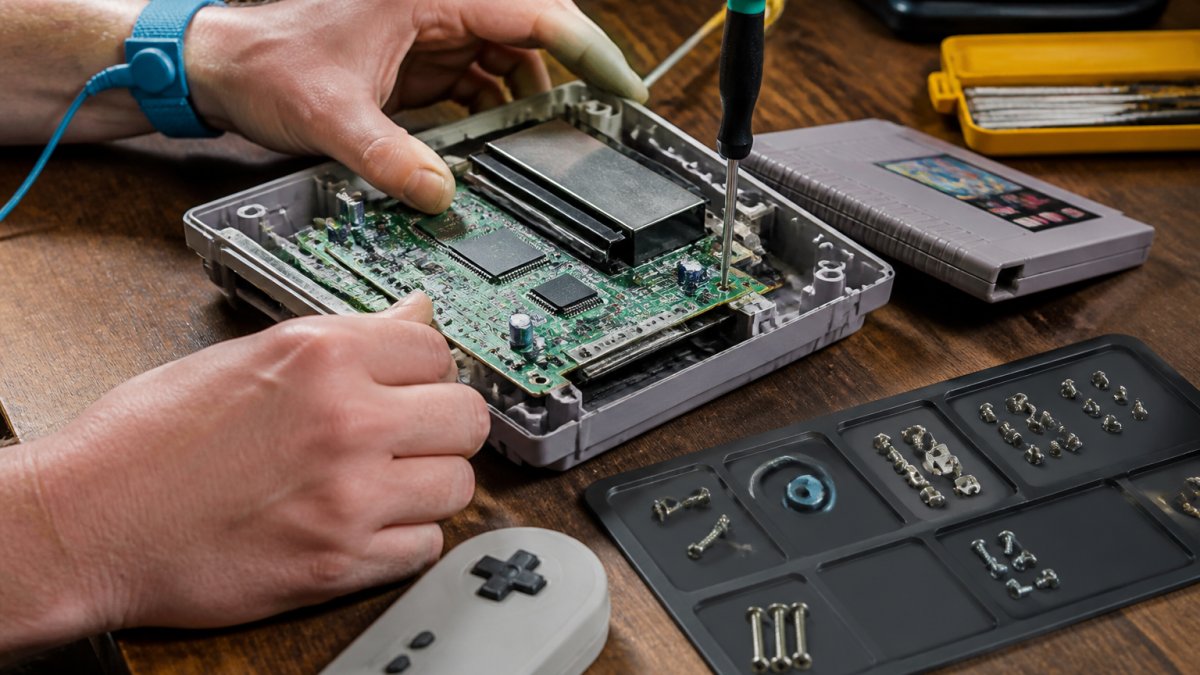
Here's the checklist any refurb should pass before it ships, and how each item gets verified on a bench.
Testing happens twice, and the before-and-after comparison tells you the most about a seller.
The before test documents the faults, disc read errors, a sticky power button, a howling fan.
The after test proves the fixes worked: same checks, run again, results written down.
Ask for both. A seller who tracks before-and-after results runs a real process; "tested and working" tells you nothing.
Refurbishment covers how a console works, not how it looks. Cosmetic grading is a separate scale, and mixing the two is one of the most common ways listings mislead buyers.
A console can be a perfect internal refurb with a yellowed shell and scratched lid, normal for hardware this old. Yellowing on a Super Nintendo or grey PlayStation comes from the plastic itself, not dirt, and no cleaning reverses it.
What a real refurb does not promise:
Inspecting a used gaming console means checking the externals in person, then asking the seller to prove the internals.
Start outside: cracks around the vents, a sticking disc tray, a power button that sinks too far.
Then move to the internals, through questions:
If you're buying online, ask for a short video of the console running a game. A real seller will send one.
We also offer console, controller and cartridge cleaning services if you'd rather have the deep clean done properly than guess at it yourself.
A refurbished console warranty should cover the work the seller performed, replaced parts, cleaning, and function as sold, and not quietly exclude the things most likely to fail.
Most listings treat the warranty as a footnote, but it's one of the best signals of whether a seller believes in their own work. A shop that did a real teardown, replacement, and test can stand behind it; one that wiped the shell and crossed its fingers can't.
Read the fine print for these traps:
Almost no listing mentions this, and it matters more with every generation. A used console can arrive with the previous owner's saves, profiles, and, on newer systems, a linked account.
Ask the seller:
A real refurb shop wipes storage, unlinks accounts, and resets to a clean state before shipping.
At Retro Gaming of Denver, every refurbished console ships with a one-year warranty. That's the standard we'd want as buyers, so it's the standard we hold ourselves to.
Doing it yourself is realistic for cleaning and basic maintenance, but gets risky fast once soldering or board-level work enters the picture.
For a clean and a thermal paste refresh, you need the right tools. Our PlayStation Toolkit covers PS1 through PS5 with the bits, spudger, tweezers, and ESD strap you need. The Xbox Toolkit does the same job for Microsoft hardware, and a FixMat keeps every screw accounted for so reassembly doesn't turn into a puzzle.


Here's where we'd draw the line:
If your console has a dead HDMI port or a power fault, that's a job for a bench with the right gear. Our repair services exist for exactly that reason.
The gap between a wiped-down console and a real refurbishment is the difference between a weekend of nostalgia and a paperweight on your shelf.
At Retro Gaming of Denver, we tear down, clean, service, and test every console before it ships, back it with a one-year warranty, and throw in free shipping on orders over $50. Browse our refurbished retro consoles and get a machine that's been through the whole process, not just the front door.
A repaired console had a specific fault fixed, like a dead disc drive or a busted HDMI port, and that's usually where the work stops. A refurbished console goes through a broader process: full disassembly, deep cleaning, thermal paste replacement, and a complete testing pass across every port, controller input, and disc or cartridge slot. The refurbished vs repaired gaming console distinction matters because a repair only guarantees the one thing that broke, while refurbishment is supposed to catch problems before they surface.
Typical replacements include worn drive belts in disc-drive systems, dried-out thermal paste under the heatsink, clogged or noisy cooling fans, and failing power supplies. Controllers often get new button membranes or analog sticks. Cartridge-based systems may need save batteries swapped. What gets replaced depends on the console generation and what the testing checklist flags, so ask the seller which parts were actually swapped versus just cleaned.
It should, and a refurbished console warranty is one of the clearest signs you're dealing with a legitimate seller. Look for coverage that explicitly includes hardware faults discovered after purchase, not just dead-on-arrival protection. Ask how claims are handled, whether you ship the unit back, and how long the process takes. A one-year warranty backed by a real support channel tells you the seller stands behind the refurbishment work rather than wiping their hands of it.
Ask the seller what their testing process covers: power-on and boot stability, every controller port, video output, audio, disc or cartridge reading, and a play session long enough to catch overheating. Then test it yourself on arrival. Run a game for at least 30 minutes, try every port, and listen for fan noise. If a seller can't describe their testing steps in detail, that's a red flag worth walking away from.


{"one"=>"Wählen Sie 2 oder 3 Artikel zum Vergleichen aus", "other"=>"{{ count }} von 3 Elementen ausgewählt"}
Wählen Sie das erste zu vergleichende Element aus
Wählen Sie das zweite zu vergleichende Element aus
Wählen Sie das dritte Element zum Vergleichen aus
Einen Kommentar hinterlassen