
Free U.S. Shipping on Orders over $50 - DAILY WORLDWIDE SHIPPING
FOR ALL SUBSCRIBERS

Last Updated: October 23, 2026
Quick Summary
The best ways to play NES games in 2026 are refurbished original hardware, cartridge adapters and clone consoles, Nintendo Switch Online, and software emulation. Original hardware wins on feel, Switch Online wins on convenience, and emulation wins on flexibility, so match the method to your TV, budget, and how much you care about the original feel.
The best ways to play NES games in 2026 come down to four real options: original refurbished hardware, cartridge adapters and clone consoles, Nintendo Switch Online, and software emulation. Each one trades authenticity for convenience in a different way, and picking wrong usually means paying twice.
Here at Retro Gaming of Denver, we've spent years refurbishing and shipping NES consoles, so we've heard every version of this question from customers who just want to hear that startup chime again. Below, we'll break down every route by cost, authenticity, and hassle, plus the display and controller fixes nobody mentions until you're already frustrated.
The short version: original hardware wins on feel, Switch Online wins on convenience, and emulation wins on flexibility. But first, here's what most guides get wrong.
| Method | Authenticity | Cost to Start | Setup Effort | Best For |
|---|---|---|---|---|
| Refurbished original NES | Highest | Console plus cartridges | Low | Purists and collectors |
| Cartridge adapter / clone console | Medium-high | Adapter or clone unit | Low | Playing real carts on modern TVs |
| Nintendo Switch Online | Medium | Subscription | None | Casual players, no clutter |
| Software emulation | Medium | Free to low | Medium | Tinkerers and preservationists |
You can play NES cartridges without an original console by using a cartridge adapter, a clone console built to accept NES carts, or a modded system with a built-in cart slot.
Cartridge adapters are the simplest route. You plug the cart in, connect the adapter to a modern display, and play. The trade-off is that adapter quality varies, and cheap units can introduce input lag or compatibility quirks with certain titles.
Clone consoles go a step further. They're built from the ground up to read original cartridges, often with HDMI output already included. For someone who wants to play NES cartridges without an NES sitting under the TV, this is the cleanest path.
The catch worth knowing: not every clone reads every cart perfectly. Games with special chips or unusual mappers can misbehave. If you're building around a few specific titles, test compatibility before you commit.
To play NES games on a modern TV, you need to convert the console's old analog signal to HDMI, either through an adapter, a modded console, or a clone system with HDMI built in.
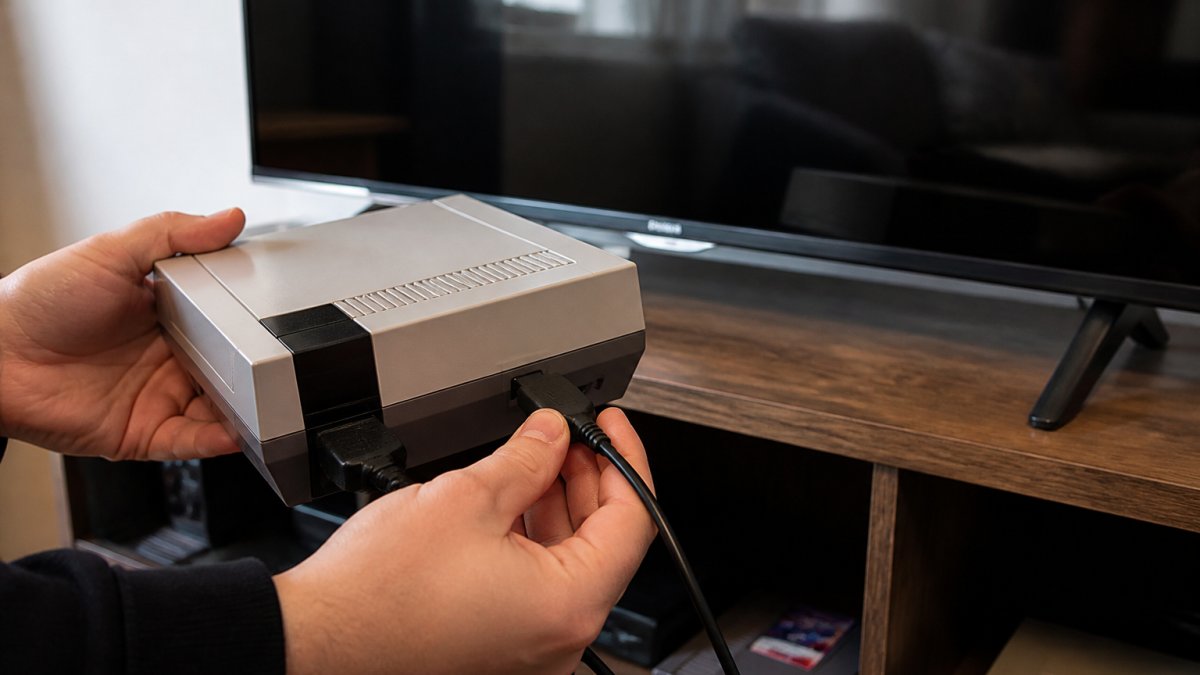
Here's the part most people miss: the NES outputs a 240p analog signal over composite (or RF on the front-loader), and modern TVs weren't built to display that gracefully.
A practical breakdown of your display options:
Controllers matter here too. The original NES controller cable is short, and sitting close to a wall-mounted TV gets old fast.
If you'd rather not fiddle with adapters, our Video Game Console & Handheld Modification Services can add modern output to a console you already own.
Nintendo Switch Online gives subscribers access to a rotating library of NES games, playable on Switch and Switch 2 with added features like save states and rewind. It's the easiest legal route to a big pile of classics without buying a single cartridge.
The library covers the essentials: Super Mario Bros., Kirby, Bomberman, and plenty of action and platformer staples. New titles get added over time, though the exact lineup shifts by region, so check your local eShop listing before assuming a specific game is there.
What you gain is convenience. What you lose is ownership. If your subscription lapses, the games go with it. For a lot of players that's fine. For collectors who want a permanent library, it's a dealbreaker.
Nintendo's own [Switch Online service page | nintendo.com] lays out the current game list and membership tiers if you want the official breakdown.
The best NES emulator depends on your device: desktop players usually want a well-maintained multi-system emulator, while handheld and mobile players need something lightweight with touch or controller support.
A few names that come up consistently in the community:
A few things separate a good emulator from a frustrating one:
On the legal side, the safe rule is simple. Emulators themselves are generally legal, but downloading ROMs of games you don't own is not. Rip your own cartridges or stick to games you've purchased. That's the line that keeps the hobby clean.
And be careful where you download. Emulator binaries from random sites are a common malware vector. Stick to the official project pages or well-known repositories, and scan anything you download before running it. A little caution here saves a lot of headaches.
The Video Game History Foundation's preservation work is a good read if you care about why this matters for keeping classic games alive.
Original hardware wins if you want the real thing: the cartridge slot, the controller feel, the exact timing. Emulation wins if you want convenience, save states, and a library that fits on a hard drive. The honest answer is that most players eventually want both.
Here's where the debate gets interesting. Emulation has gotten remarkably good, and for casual weekend sessions it's more than enough. But there's a reason refurbished NES consoles still sell: the physical ritual of blowing into a cart (don't, by the way) and hearing the startup is part of the experience.
If you go the original hardware route, buy refurbished rather than "as-is." A properly reconditioned console has clean pins, tested components, and a warranty behind it. That's the difference between a display piece and something you actually play.
Building a library is where the hobby gets expensive fast, so start with the games you'll actually replay. Super Mario Bros. and the arcade-style classics are the safe first buys, then branch into the underrated titles that hold up better than their reputation suggests.
We keep a rotating selection of tested, cleaned cartridges in our Nintendo collection, including titles like Jaws, Wizards and Warriors, and Little Nemo The Dream Master. Every cart we sell has been reconditioned and tested, so you're not gambling on a mystery listing.

A few buying tips that save real money:
The hardest part of playing NES games in 2026 isn't finding a method. It's picking one and actually starting instead of researching forever. Whichever route you choose, the games are still there, still hard, and still worth it.
If you want the real thing without the risk of a dead console, Retro Gaming of Denver has you covered. We offer refurbished NES systems backed by a 1-year warranty, free shipping on orders over $50, and a curated stock of tested cartridges. Every system we ship is fully reconditioned, not just wiped down, and our team is here if anything goes wrong.
Ready to hear that startup chime again? Shop by popular retro systems and get back to playing.
Yes, you can play NES cartridges without an original NES by using a compatible clone console or a cartridge adapter for certain modern systems. These devices read the original game data from the cartridge and output video to your TV. However, compatibility and build quality vary, so check reviews and ensure the device supports the specific cartridges you own. For the most authentic experience, refurbished original hardware remains the gold standard.
The best NES emulator depends on your needs, but popular choices include Mesen, Nestopia, and FCEUX. Mesen is known for its accuracy and debugging tools, Nestopia offers a good balance of compatibility and performance, and FCEUX is widely used for its features and community support. All are free and legal to use with ROMs you own. For a simple setup, RetroArch provides a front-end that supports multiple emulators.
Nintendo Switch Online members get access to a library of NES games at no extra cost. The base subscription includes a selection of classic NES titles, and the Expansion Pack adds more consoles like SNES and Sega Genesis. Games are playable as long as your subscription is active. This is a legal and convenient way to enjoy NES games on modern hardware, though the library rotates and may not include every title.
Yes, most modern TVs lack the composite inputs used by the original NES. You'll need an adapter that converts the NES's composite output to HDMI. Options range from simple composite-to-HDMI converters to dedicated upscalers like the RetroTINK. For the best picture quality, an upscaler is recommended, but a basic converter works for casual play. Alternatively, an HDMI modification can be installed directly into your NES for a cleaner setup.


{"one"=>"Wählen Sie 2 oder 3 Artikel zum Vergleichen aus", "other"=>"{{ count }} von 3 Elementen ausgewählt"}
Wählen Sie das erste zu vergleichende Element aus
Wählen Sie das zweite zu vergleichende Element aus
Wählen Sie das dritte Element zum Vergleichen aus

Einen Kommentar hinterlassen